
Register and activate an Alaya NeW enterprise account — fill in the form, set the password from your email link, and complete activation
The procedure for registering and activating an Alaya NeW enterprise account is described below.
Registration steps
-
Open the Alaya NeW website and locate the
Sign Upbutton in the top-right corner.
-
Click
Sign Upto open the Enterprise registration page. Fill in the registration parameters per the prompts — username, email, phone number, SMS verification code, and so on — then check the "I have read the User Agreement and Privacy Policy" option.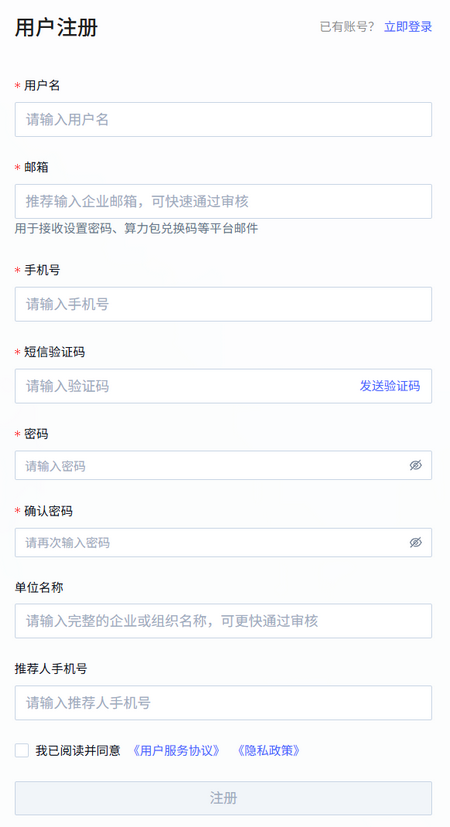
Parameter Description Requirements Example Required Username The name used in the system for login and identification Lowercase letters and digits only, must start with a lowercase letter, 4–20 characters admin Yes Email The email address bound to the username, used for account verification, password recovery, notifications, Compute Power Pack redemption codes, etc. Valid email format and an existing mailbox — Yes Phone The user's mobile phone number, used to receive SMS verification codes and other notifications A real, active mobile number — Yes SMS code The temporary verification code sent to the user's phone, used for identity verification or specific operations The actual code received — Yes Organization name The user's organization name — Alaya NeW No Referrer phone The referrer's mobile phone number A real, active mobile number — No -
Once the registration parameters are filled in, click
Sign Upto submit. -
Open the email address used for registration, find the Alaya NeW user invitation email, and click the "Click this link to set your initial password" link. The system opens a "Set password" dialog.
The initial-password link is valid for 60 minutes — set the password promptly. If the link expires, click "Forgot password" on the sign-in page and the system will resend the password-setup email.
- Set the login password in the dialog and click
OK. Enterprise account registration and activation are now complete. You can sign in to your Alaya NeW enterprise account using the username and the password you just set.
The login password must contain uppercase letters, lowercase letters, digits, and symbols, and be 8–18 characters long.
Next steps
Last updated on