
Provision a shared or dedicated VKS cluster — configure compute, storage, and options to host training and inference workloads
Once you have an Alaya NeW enterprise account with sufficient balance, follow the steps below to provision a Virtual Kubernetes Service (VKS) cluster.
Prerequisites
- An Alaya NeW enterprise account and password. If you have not registered, see Sign up.
- Sufficient account balance for the planned inference / training workloads. For current promotions and pricing details, contact us.
Steps
-
Sign in to the Alaya NeW platform with your enterprise account, then go to Products / Virtual Kubernetes Service to open the VKS overview page.
-
Click
New Clusterto open the VKS provisioning page and configure the cluster name, description, region, and other basic information.Parameter Description Requirements Example Required Cluster name Identifier for the cluster; uniquely identifies it in the system Must start with a letter; supports letters, digits, hyphen (-), underscore (_); 4–20 characters jskfb-zqf Yes Cluster description A short description of the cluster's function, purpose, and configuration — — Yes Region The data center hosting the LLM inference / training service Pick an available data center, e.g. Beijing Zone 1, Beijing Zone 2, Beijing Zone 3 — Yes Cluster type Shared: all authorized users share the entire VKS workspace with no isolation between users — suited for team collaboration.
Dedicated: each authorized user gets workspace isolation via a Namespace inside the VKS, with per-user resource limitsPick by business needs — Yes Billing mode The billing method for data-center resources E.g. pay-as-you-go — Yes Compute spec Hardware specification of the data center, including GPU model, DCU per card per hour, quota, etc. Pick resources that meet your inference / training service needs — Yes Storage configuration Storage type (e.g. mass storage), status, capacity, storage service allocation, etc. The "10 GB free" option can be selected Pick a configuration that meets your data-persistence needs — Yes Optional Extra features as needed, e.g. enabling external service exposure — — No - For compute spec, only pick the GPU model and the number of GPU cards you need; do not exceed the maximum allowed by your current entitlement.
- You can scale enterprise storage on demand; mass storage must be allocated to file storage, object storage, or the image registry before it can be used.
-
Once the parameters are configured, click
Enable Nowto complete cluster provisioning. You can view the new cluster on the Resource Center / Virtual Kubernetes Service page. When the status reads "Running", the cluster is ready to use.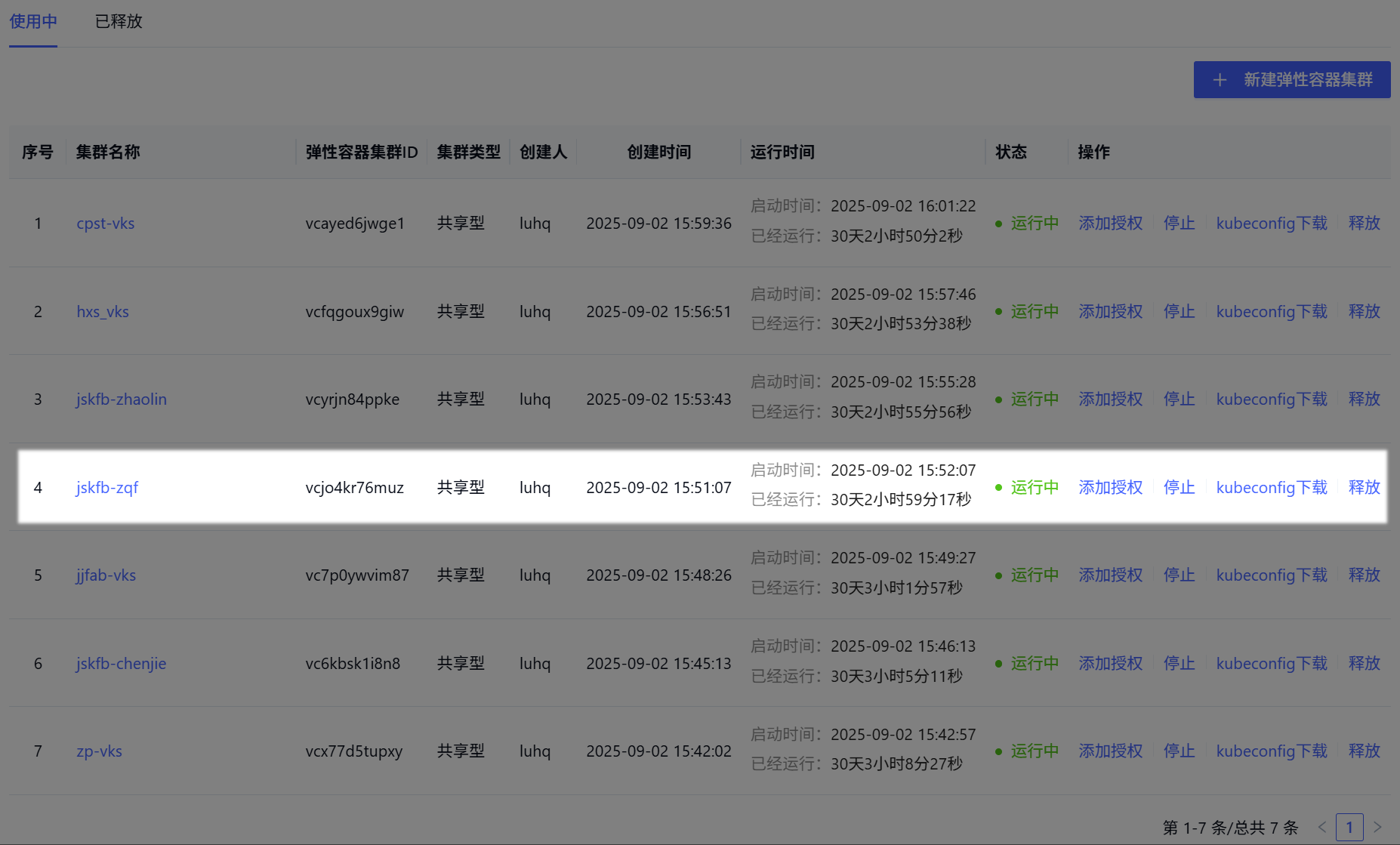
- After provisioning, only authorized users can access the VKS. Configure and add authorized users promptly. See Authorize a VKS cluster.
- For cluster usage, see Use VKS.
Next steps
Last updated on